
Shopify Page Speed Optimization: Make Your Store Lightning-Fast in 2025
In the fast-paced world of eCommerce, every second counts. Your Shopify store’s page speed isn’t just about technical performance — it’s about user experience, SEO ranking, and conversion rate.
A one-second delay can reduce conversions by up to 7%, and Google ranks faster websites higher in search results. So, if your Shopify store takes too long to load, you’re not just losing visitors — you’re losing money.
- This guide will walk you through Shopify page speed optimization techniques that can make your store lightning-fast, improve customer satisfaction, and help you dominate search results in 2025.
-
Before jumping into fixes, let’s understand what “page speed” really means.
Page speed refers to how long it takes for your Shopify store’s page to fully load and become interactive for users. It’s influenced by several factors such as:
- Image sizes and formats
- App scripts and third-party integrations
- Theme design and code quality
- Server response time
- Browser caching and liquid code performanceYou can check your current performance using tools like:
- Google PageSpeed Insights
- GTmetrix
- Shopify Analyzer (by Shopify partners)These tools give you a performance score, showing what slows your store down and where you can improve.
How Page Speed Affects SEO and Conversions
Shopify page speed optimization isn’t just about numbers — Shopify page speed optimization it directly affects your business outcomes.
SEO Ranking
- Google considers site speed as a ranking factor. Faster sites are more likely to appear on the first page of search results, especially on mobile devices.
-
User Experience
-
Visitors expect your pages to load in under 3 seconds. Anything longer increases bounce rates dramatically.
- Conversions
-
Every second of delay can cost you potential sales. Fast-loading pages create trust and improve checkout completion rates.
-
Bottom line: Faster site = more visitors staying + more customers buying.
. Benchmark: What’s a Good Shopify Page Speed?
- Excellent: Under 2 seconds
- Good: 2–3 seconds
- Needs improvement: 3–5 seconds
- Critical: Over 5 secondsYour goal should be to consistently keep your store load time below 3 seconds on both desktop and mobile.
Common Reasons Shopify Stores Are Slow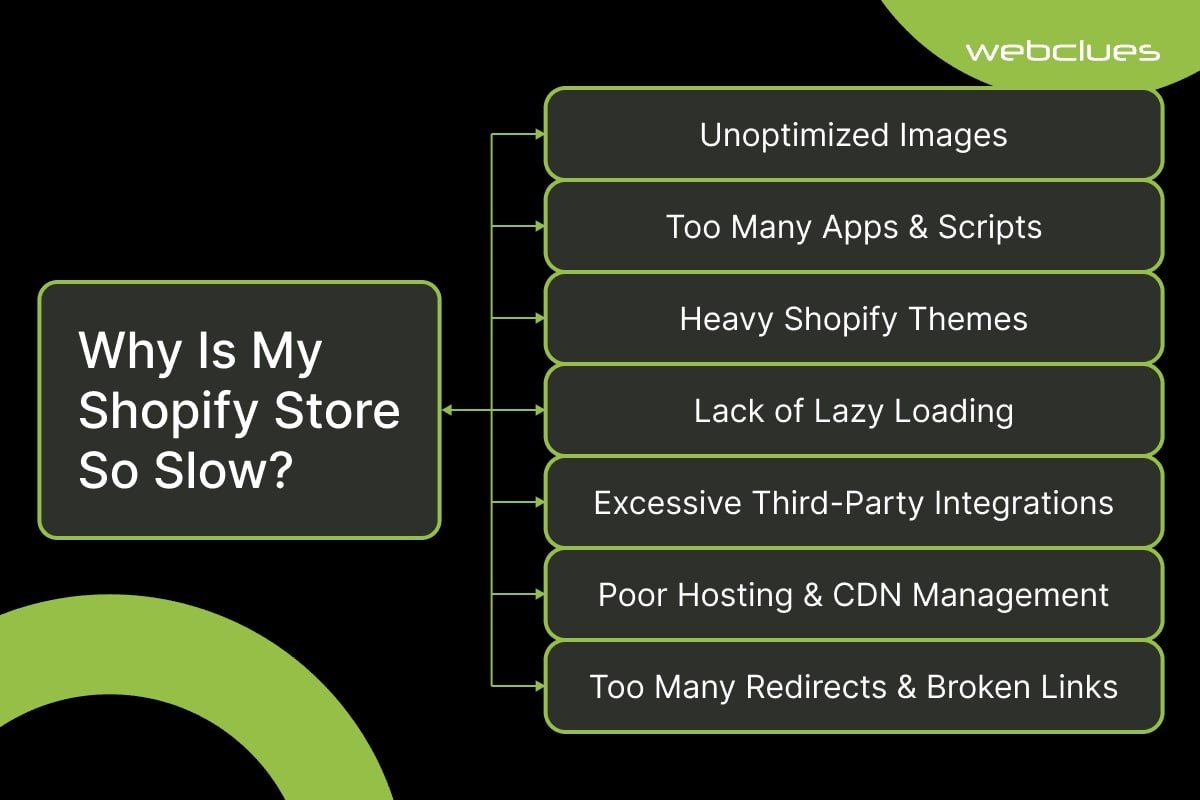
- Shopify is a powerful platform, but performance often slows down due to unnecessary elements. Here are common culprits
- Unoptimized images (too large or wrong format)
- Too many Shopify apps running background scripts
- Heavy, complex themes with unclean code
- Unused CSS or JavaScript bloating the site
- No browser caching or minification
- Autoplay videos or large sliders on homepage
- External tracking codes (like Facebook Pixel, Hotjar, etc.)
- Third-party fonts and widgets slowing initial load
- Step-by-Step Shopify Page Speed Optimization Techniques
Now that you know what slows your store down, let’s fix it.
Follow these proven steps to make your Shopify store faster and more efficient.
Step 1: Optimize Images Without Losing Quality
Images are often the biggest reason for slow Shopify stores
Best Practices:
Use WebP or AVIF formats (smaller than JPG/PNG).
Compress images using tools like TinyPNG or ImageOptim.
Resize images to the exact display size — avoid uploading 4000px-wide images for 400px display areas.
Implement lazy loading so images load only when users scroll to them.
Shopify’s built-in image optimization helps, but manual compression before upload gives better control.
Step 2 : Limit Apps and Third-Party Scripts
Each app adds extra JavaScript or CSS, which increases page load time.
Optimization Tips:
Audit all installed apps regularly.
Remove apps you don’t use anymore.
Replace multiple apps with all-in-one solutions.
Load non-essential scripts asynchronously.
Pro Tip: After uninstalling apps, remove leftover code snippets manually from your theme.liquid file.
Step 3: Minify and Combine CSS/JS Files
Large CSS and JavaScript files slow down rendering.
How to Fix:
- Minify CSS and JS using Shopify’s built-in compression or online tools like MinifyCode.com.
- Merge small scripts into one file to reduce HTTP requests.
Avoid inline CSS — use external minified files instead.If you’re using a premium Shopify theme, check if code minification is already built-in.
Step 4: Choose a Fast, Lightweight Theme
Not all Shopify themes are built the same. Some have bloated code and unnecessary scripts.
Best Practices:
- Choose themes optimized for performance like Dawn, Impulse, or Motion.
- Avoid excessive animations or sliders.
- Test your theme’s speed before publishing it. Pro Tip: Shopify’s “Online Store 2.0” themes are faster and more efficient — upgrade if you haven’t already.
Step 5: Enable Browser Caching and CDN
Shopify automatically uses Content Delivery Network (CDN) via Fastly for faster global delivery — but you can still enhance caching.
What You Can Do:
- Use Shopify’s built-in CDN for all assets.
- Cache large resources like fonts and images.
- Use cache-control headers where possible for returning visitors.This ensures returning users load your store almost instantly.
Step 6: Optimize Fonts and Icons
Custom fonts and icon libraries (like FontAwesome) add extra load time.
- Optimization Tips:Use system fonts (Arial, Helvetica, etc.) where possible.
- Limit to 1–2 font families only.
Use font-display: swap; to prevent blank text during load.
This small tweak can improve your store’s first contentful paint (FCP) score.
Step 7: Reduce Redirects and Broken Links
Every redirect adds an extra HTTP request, which slows your site.
- Action Plan:
- Avoid redirect chains (like A → B → C)
- Fix broken links using tools like Ahrefs Site Audit or Broken Link Checker.
- Use direct URLs instead of shortened or tracking ones.
Step 8: Improve Mobile Speed
Over 70% of Shopify traffic comes from mobile devices — so optimizing for mobile is essential.
Key Tips:
- Use mobile-responsive themes.
- Compress images more aggressively for mobile.
- Avoid heavy pop-ups or autoplay media.
Test mobile performance with Google Lighthouse.
Step 9: Monitor Performance Regularly
Optimization is not a one-time task.
Ongoing Monitoring:
- Use Google PageSpeed Insights weekly.
- Track Core Web Vitals (LCP, CLS, FID).
- Recheck performance after installing new apps or changing themes. Pro Tip: Keep a changelog — if speed drops suddenly, you can identify the cause quickly.
Tools for Shopify Page Speed Optimization
Here are some of the most effective tools for analyzing and improving your Shopify store speed:
| Tool | Purpose |
| Google PageSpeed Insights | Core Web Vitals and overall speed score |
| GTmetrix | Performance report and waterfall breakdown |
| Shopify Analyzer | Custom Shopify performance insights |
| TinyPNG | Image compression |
| Sitebulb / Screaming Frog | Crawl speed and technical SEO |
| Cloudflare CDN | Additional caching and protection layer |
-
Bonus: Advanced Shopify Speed Optimization Tips

For those ready to go beyond the basics:
- Implement AMP (Accelerated Mobile Pages) for blogs.
- Use Shopify Hydrogen or Headless architecture for enterprise-level performance.
- Optimize Liquid code loops and avoid unnecessary “for” statements.
- Preload key resources (fonts, hero images, etc.).
Use lazy load for embedded videos (YouTube or Vimeo).
These advanced techniques can further cut milliseconds off your load time — which Google loves.
. Mistakes to Avoid During Shopify Page Speed Optimization
- Even with good intentions, many store owners make these errors:
- Over-compressing images (reduces quality)
- Deleting app code without backups
- Using multiple optimization apps at once
- Ignoring mobile experience
Adding unnecessary tracking scripts
Avoid these pitfalls to keep your store both fast and functional.
. The ROI of Shopify Page Speed Optimization
Investing time or budget in Shopify speed optimization delivers measurable results:
| Metric | Before Optimization | After Optimization |
| Load Time | 5–7 seconds | 1.8–2.5 seconds |
| Bounce Rate | 60–70% | 30–40% |
| Conversion Rate | 1–1.5% | 3–4% |
| SEO Rankings | Page 2–3 | Page 1–2 |
A faster Shopify store doesn’t just look better — it earns more.
. Conclusion: Speed = Sales

In today’s eCommerce landscape, Shopify page speed optimization isn’t optional — it’s essential. A faster store leads to better SEO, happier customers, and higher profits.
Whether you run a small Shopify boutique or a large online brand, optimizing your site speed is one of the most effective ways to scale your business in 2025.
If you’re unsure where to start or need expert help, our Shopify optimization services can analyze, fix, and fine-tune your store for top performance — so you can focus on what really matters: growing your brand.
- Quick Recap: Shopify Page Speed Optimization Checklist
- Compress and convert images to WebP
- Remove unused apps and leftover code
- Minify CSS/JS files
- Use a lightweight theme
- Optimize fonts and caching
- Test performance regularly
Visit my other blog